Saturday, November 9, 2019

How To Setup Vozga Blogger Template [Way2Themes]

Vozga Blogger Template is a super stylish and elegant looking theme that is made for fashion magazine blogs. Loaded with many user friendly features, which lets you create a phenomenon looking blog in no time. Vozga is equipped with various of widgets which will help you to publish your blog more professionally. To make it easy for you we have published this detailed documentation, so that you can setup your blog correctly. You have made a good decision by choosing our template.
You can check the live demo or download the template through the button below and also Please Read this documentation carefully in order to set up your blog and please note that there’s no support for free users.

Basic Setup

  1. Template Installation
  2. Logo Setup
  3. Template Setting
  4. Shortcodes & Markups
  5. Create Sitemap

Video Documentation

You can check this below video to understand the setup process much more easily, just click the below image to watch the video directly on YouTube, or click this link - How To Setup Vozga Blogger Template - Way2Themes

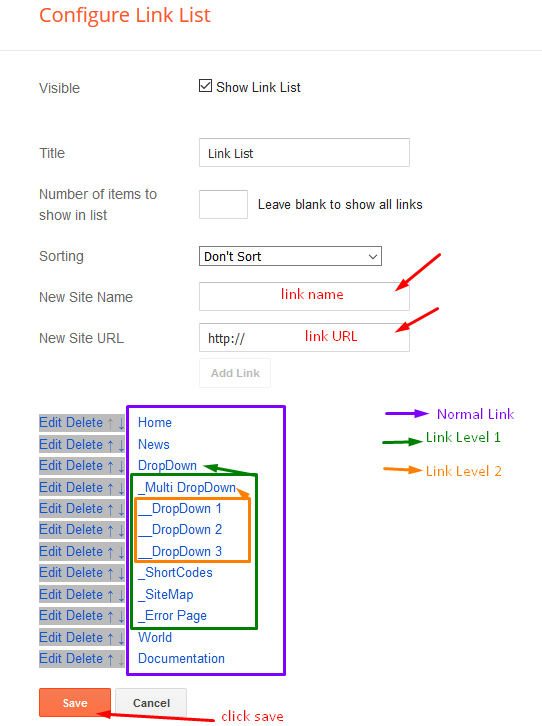
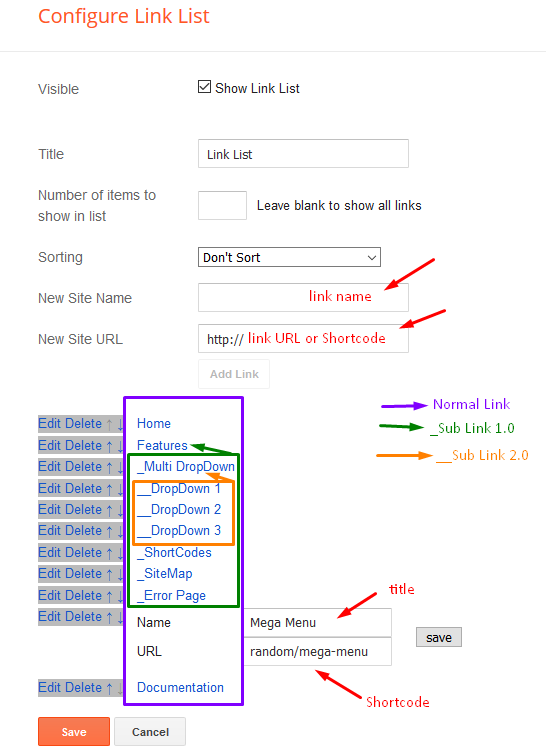
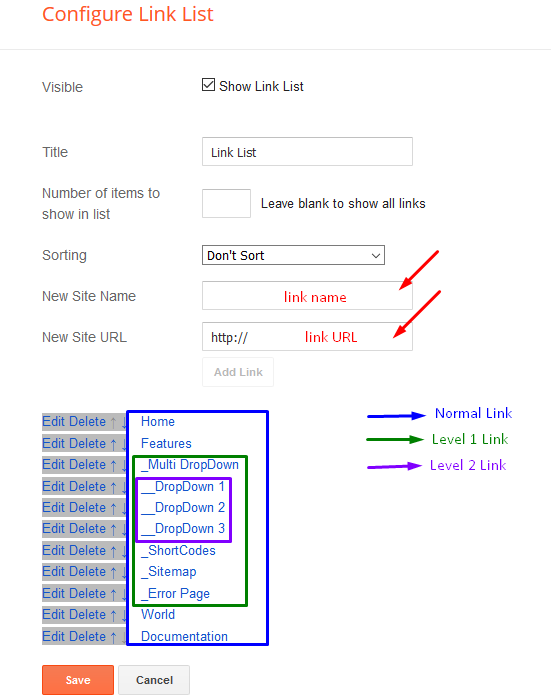
Main Menu

Access your blog Layout > click Edit icon on Main Menu widget.

Normal Link : Features
Sub Link: _Sub Link 1.0 (before the link add "_") 1 underscore
Sub Link 2: __Sub Link 1.1 (before the link add "__") 2 underscore
Main Intro

Access your blog Layout > click Edit icon > on Main Intro widget.

Example:

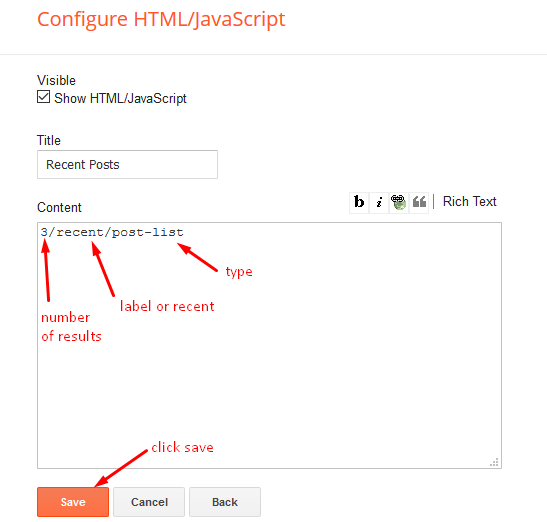
Post List Widget

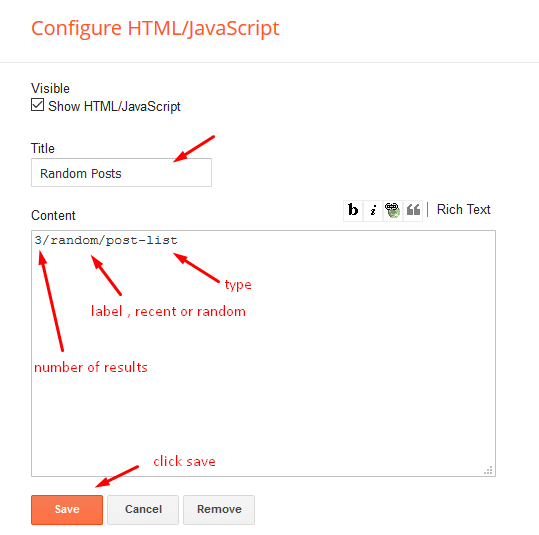
Access your blog Layout > click Add a Gadget > HTML/JavaScript on Sidebar or Footer section, you must place the following names highlighted in blue below.

Shortcode: Results number/Label or recent or random/post-list
Label Posts: 3/Food/post-list
Recent Posts: 3/recent/post-list
Random Posts: 3/random/post-list

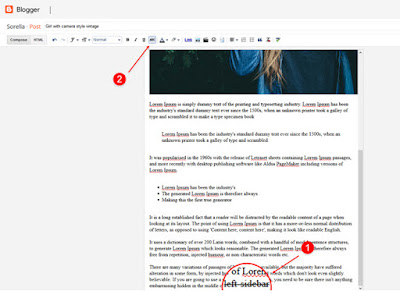
Post Layouts

Left Sidebar: Inside the post add the text left-sidebar and add the style Strikethrough
Full Width: Inside the post add the text full-width and add the style Strikethrough
Right Sidebar: Inside the post add the text right-sidebar and add the style Strikethrough

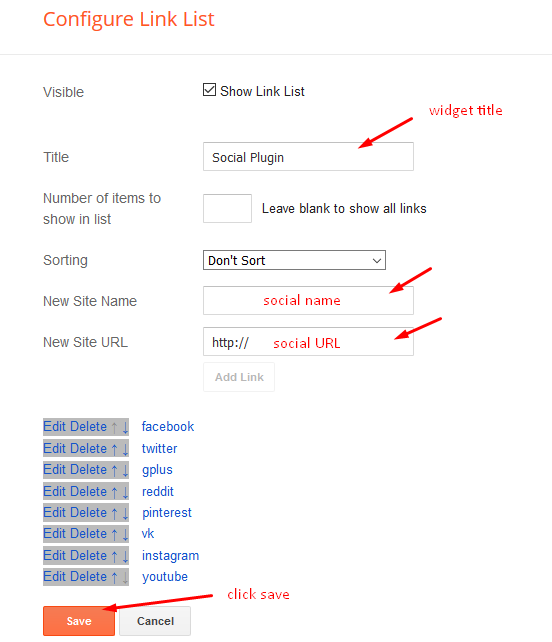
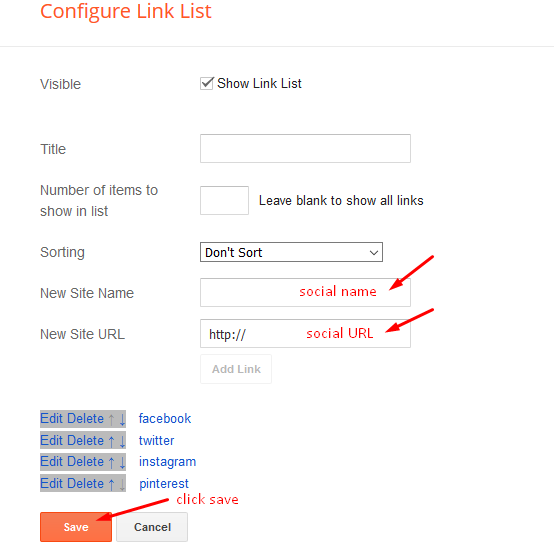
Social Widget (Sidebar)

Access your blog Layout > click Edit icon on Social Widget section.

Avaliable Icons { facebook, twitter, gplus, rss, youtube, skype, stumbleupon, tumblr, vk, stack-overflow, github, linkedin, dribbble, soundcloud, behance, digg, instagram, pinterest, twitch, delicious, codepen, reddit, whatsapp, snapchat, email }

Theme Options

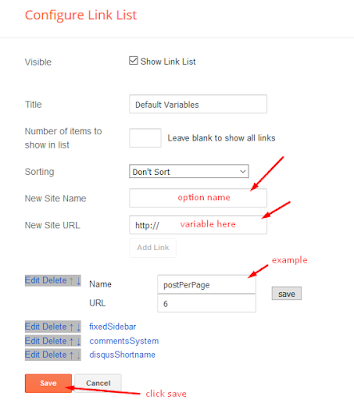
01 - Default Variables

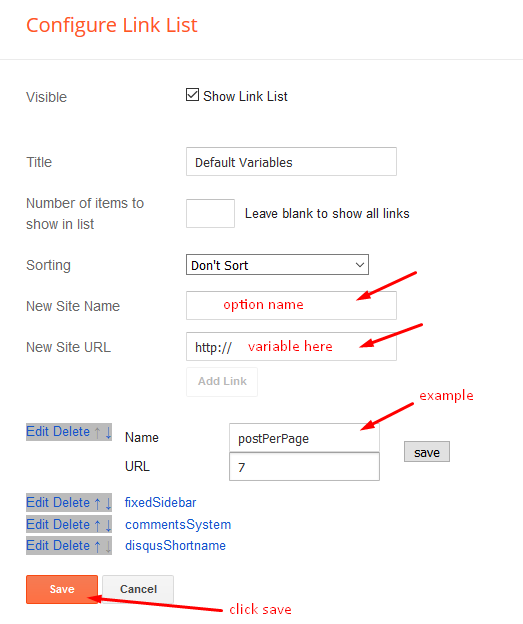
 Access your blog Layout > click Edit icon on Default Variables widget.

Post Per Page: In New Site Name add postPerPage, in New Site URL add the number of results, it should be the same as the posts from the home page, after click on save button.

Fixed Sidebar: In New Site Name add fixedSidebar, in New Site URL  add true or false, after click on save button.

Comments System: In New Site Name add commentsSystem, in New Site URL add the comments sytem type {bloggerdisqusfacebook or hide}, after click on save button.

Disqus Shortname: In New Site Name add disqusShortname, in New Site URL add your disqus comment system shortname, after click on save button.

Facebook Page Plugin 

Access your blog Layout > click Add a Gadget > HTML/JavaScript on Sidebar or Footer section, and paste the code below.

<center><div class="fb-page" data-href="https://www.facebook.com/way2themes" data-width="360" data-small-header="false" data-adapt-container-width="true" data-hide-cover="false" data-show-facepile="true"></div></center>

Note: In Attribute data-href replace the link per your facebook page url.

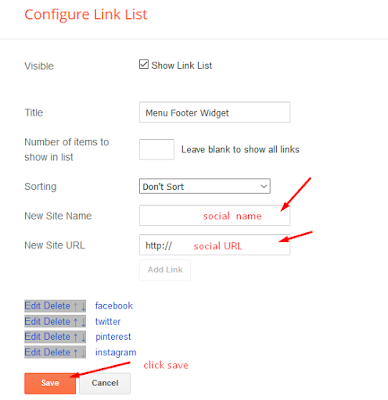
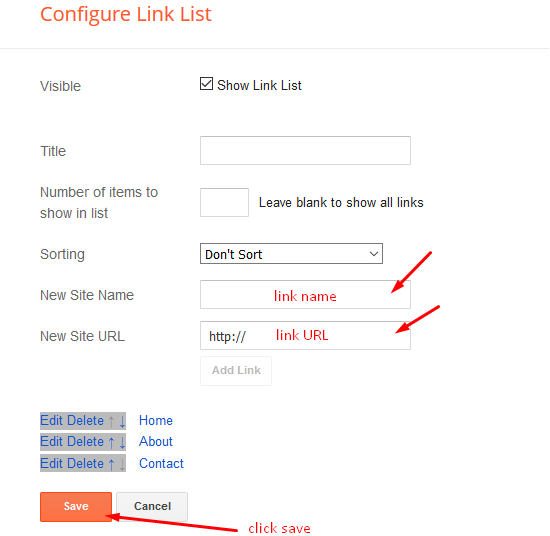
Footer Menu

Access your blog Layout > click Edit icon on Footer Menu widget.


Customizing Your Template

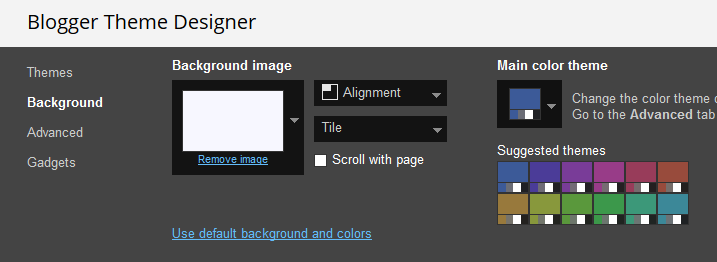
Access your blog Theme > click Customize button.

Here you can change the background, and apply pre-defined colors

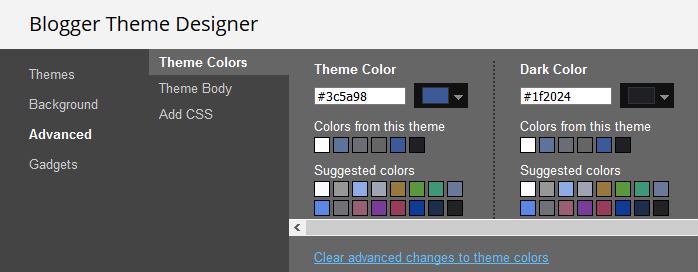
Clicking Advanced You will see the official option to change the Main Colors.
Installation And Custom Services

We provide plenty of templates for free but if you want something unique for your blog then let us create a unique design for your blog, Just tell us your needs and we will convert your dream design into reality. We also Provide Blogger Template Installation Service. Our Installation service gives you a simple, quick and secure way of getting your template setup without hassle.

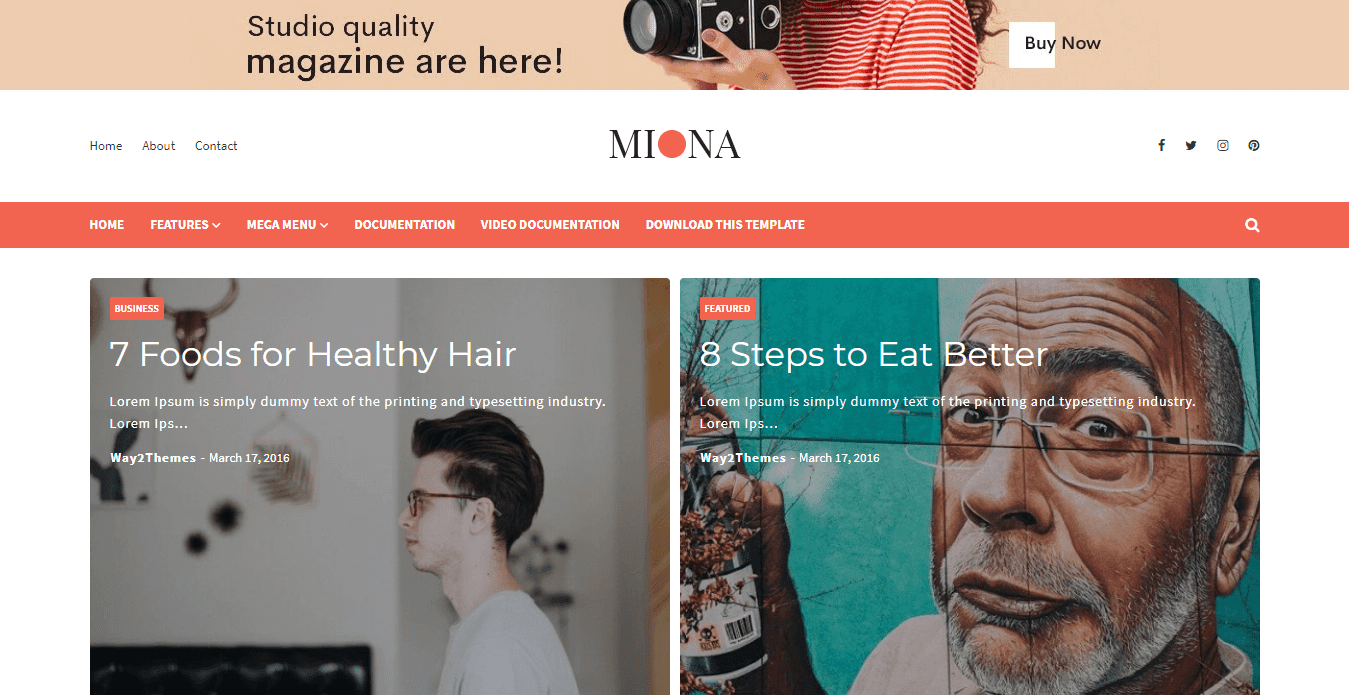
Only Premium Buyers will get the widget codes available in the demo.
If you are a premium version user and you are having any problem while setting up the template please contact us by going to this link (Contact Form).

Friday, October 25, 2019

Miona Blogger Template Premium Gratis 100% Dari Way2themes | Free Blogger Templates
ahmadnurhadirmw - Miona Blogger Template adalah tema yang dirancang luar biasa dengan tata letak responsif yang dioptimalkan dengan sempurna. Itu terlihat cantik di ceruk apa pun, apakah Anda menulis tentang makeup, OOTD, travel atau blog kecantikan. Ini adalah tema yang dioptimalkan penuh seo penuh, dibuat dengan struktur pengkodean generasi baru blogger, yang membuatnya menjadi tema pemuatan cepat. Dibuat dengan sempurna, tema ini memberi Anda kanvas kosong, yang memungkinkan Anda membuat sesuatu yang fenomenal dalam langkah-langkah sederhana dan memungkinkan Anda menyesuaikannya tanpa pengetahuan pengkodean. Ini memiliki banyak fitur seperti menu dropdown, posting fitur bergaya, desain bersih dan minimal dll!

Template ini untuk blogger google bukan untuk blog atau wordpress, google blogger ini didesain untuk para orang-orang kretive di seluruh dunia. template blogger ini free dan freemium, template blogger premium, template blogger responsive, template blogger simple, template blogger gratis, blogger google ads, template blogger seo.

Basic Setup

  1. Template Installation
  2. Logo Setup
  3. Template Setting
  4. Shortcodes & Markups
  5. Buat Sitemap

Templates Blogger Miona:

  1. 100% Murni Responsif - PERIKSA
  2. Google Validasi - PERIKSA
  3. Ramah Ponsel - PERIKSA
  4. Memuat Kecepatan - PERIKSA
  5. Halaman Galat - PERIKSA
  6. Dokumentasi Lengkap - PERIKSA
  7. Baca Lebih Lanjut Dengan Gambar Kecil
  8. Widget Pos Populer Kustom
  9. Desain Minimal & Bersih
  10. Widget Komentar Khusus
  11. Multi Dropdown
  12. 2 kolom
  13. Widget Sosial Bergaya
  14. Pos terkait
  15. Fitur Lebih Keren

Fitur Unlock

  • Hapus Kredit Footer
  • Layanan Pengaturan Blog
  • Tidak Ada Script Terenkripsi
  • Dukungan Premium 7 Hari
  • Untuk Domain Tidak Terbatas
  • Pembaruan Templat Seumur Hidup
  • Versi diperpanjang
  • Anda akan mendapatkan akses penuh dari templat dalam versi yang diperluas.
  • Addons HEAD

Review

Templates Miona ini sendiri adalah template untuk personal dan bisnis, yang dimana di khususkan penggunanya adalah laki-laki dan perempuan Template yang mengesankan, profesional, responsif, terbaik yang sangat cocok untuk situs web Berita, Blogger Pribadi, Majalah, Toko. Ini adalah Template Blogger SEO yang responsif dan cantik, Pilihan sempurna untuk mode & tata letak blog minimalis, blog OOTD, blog pribadi, blog Niche, blog otoritas, atau semua jenis blog kreatif atau majalah sederhana.

Beranda dirancang untuk multi guna, blog Otoritas, Agensi, Aplikasi, Arsitek, Toko Roti, Kotak, Desain perbatasan, Bisnis, Amal, Perguruan Tinggi, Konstruksi, Perusahaan, Pendidikan, Hosting, Industri, Majalah, Medis, Pribadi, Portofolio, Restoran, Sekolah, Toko, Perjalanan, Universitas, Pernikahan dll.

Saya disini hanya mendecode script yang di encode tidak ada link atau credit yang di hapus, tinggal user saja yang memilih. jika ada link/credit yang di hapus bukan tanggung jawab kami, selaku admin Themeploit. Harap Hargai Kerja keras Developers jika tidak ada mereka blog anda kumel ☺. jika kalian ingin dihargai silakan langsung beli templatenya ke developernya. best free responsive blogger templates for education template with drop down menu food and cooking adsense online shop news portal business without footer credit store affiliate marketing your blog download xml 2016 2019 2015 2017 2018 where to get slider personal photo gallery one column job ivy themes how html code graphic designers
Disini kamu hanya perlu melihat opsi 2 button di bawah lihat yang Code Premium jika button ini mengarah ke Paste2.org maka yang kamu perlukan Download Template (Button ke-2), jika tombol button Code Premium mengarah ke File maka itulah download File dan sekaligus sudah di patch kode encryptednya tinggal install ke Bloggeralert-info

Jika Memiliki Kendala Tolong Berkomentar.alert-info
contact-form

Wednesday, October 23, 2019

How To Setup Blueberry Blogger Template [Way2Themes]

Blueberry is a clean and simple fashion blogger template, with elegant layout and fast loading design, it becomes one of the most favorable and ideal theme for this niche. Blueberry is equipped with various of widgets which will help you to publish your blog more professionally. To make it easy for you we have published this detailed documentation, so that you can setup your blog correctly.
You have made a good decision by choosing our template. You can check the live demo or download the template through the button below and also Please Read this documentation carefully in order to set up your blog and please note that there’s no support for free users.

Basic Setup

  1. Template Installation
  2. Logo Setup
  3. Template Setting
  4. Shortcodes & Markups
  5. Create Sitemap

Video Documentation

You can check this below video to understand the setup process much more easily, just click the below image to watch the video directly on YouTube, or click this link - How To Setup Blueberry Blogger Template - Way2Themes


    Main Menu

    Access your blog Layout > click Edit icon on Main Menu widget.

    Normal Link : Features
    Link Level 1: _Sub Link 1.0 (before the link add "_") 1 underscore
    Link Level 2: __Sub Link 1.1 (before the link add "__") 2 underscore

    Hot Posts

    Access your blog Layout > click Add a Gadget > HTML/JavaScript on Hot Posts section, you must place the following names highlighted in blue below.

    Shortcode: Labelrecent or random/hot-posts

    Example: Food/hot-posts


    Post List Widget

    Access your blog Layout > click Add a Gadget > HTML/JavaScript on Sidebar or Footer section, you must place the following names highlighted in blue below.

    Shortcode: Results number/Label or recent/post-list
    Label Posts: 3/recent/post-list
    Recent Posts: 3/Food/post-list


    Post Layouts

    Left Sidebar: Inside the post add the text left-sidebar and add the style Strikethrough
    Full Width: Inside the post add the text full-width and add the style Strikethrough
    Right Sidebar: Inside the post add the text right-sidebar and add the style Strikethrough


    Theme Options

    Access your blog Layout > click Edit icon on Default Variables widget.

    Post Per Page: In New Site Name add postPerPage, in New Site URL add the number of results, it should be the same as the posts from the home page, after click on save button.

    Fixed Sidebar: In New Site Name add fixedSidebar, in New Site URL  add true or false, after click on save button.

    Comments System: In New Site Name add commentsSystem, in New Site URL add the comments sytem type {bloggerdisqusfacebook or hide}, after click on save button.

    Disqus Shortname: In New Site Name add disqusShortname, in New Site URL add your disqus comment system shortname, after click on save button.

    Facebook Page Plugin 

    Access your blog Layout > click Add a Gadget > HTML/JavaScript on Sidebar or Footer section, and paste the code below.

    <center><div class="fb-page" data-href="https://www.facebook.com/way2themes" data-width="360" data-small-header="false" data-adapt-container-width="true" data-hide-cover="false" data-show-facepile="true"></div></center>

    Note: In Attribute data-href replace the link per your facebook page url.

    Footer Social Icons

    Access your blog Layout > click Edit icon on Social Footer widget.

    Avaliable Icons { facebook, facebook-f, twitter, gplus, rss, youtube, skype, stumbleupon, tumblr, vk, stack-overflow, github, linkedin, dribbble, soundcloud, behance, digg, instagram, pinterest, pinterest-p, twitch, delicious, codepen, reddit, whatsapp, snapchat, email }


    Customizing Your Template

    Access your blog Theme > click Customize button.

    Here you can change the background, and apply pre-defined colors


    Clicking Advanced You will see the official option to change the Main Colors.

    Installation And Custom Services

    We provide plenty of templates for free but if you want something unique for your blog then let us create a unique design for your blog, Just tell us your needs and we will convert your dream design into reality. We also Provide Blogger Template Installation Service. Our Installation service gives you a simple, quick and secure way of getting your template setup without hassle.

    Tuesday, October 22, 2019

    Blogxer Blogger Template Premium Gratis 100% Dari Way2themes | Free Blogger Templates
    Blogxer Blogger Template adalah mudah digunakan dan cepat modern yang bersih template blogger.
    ahmadnurhadirmw - Blogxer Blogger Template adalah mudah digunakan dan cepat modern yang bersih template blogger. Dilengkapi dengan semua yang Anda butuhkan untuk membuat blog & galeri foto yang indah, desain minimalis modern, dan sangat fokus pada tipografi, kemudahan penggunaan, dan template blogger minimalis dalam filosofi desain. Ini cocok untuk blog Makanan, Blog Gaya Hidup, Blog Fotografi, Blog Kue, Blog perjalanan, blog Parenting / Mom, Kesehatan, Kebugaran dan Gym, Blog Pribadi, Blog Mode, Blog Yoga, Blog Hewan Peliharaan, Mag mobil, Mag Permainan, Mag Tek dan masih banyak lagi.!

    Template ini untuk blogger google bukan untuk blog atau wordpress, google blogger ini didesain untuk para orang-orang kretive di seluruh dunia. template blogger ini free dan freemium, template blogger premium, template blogger responsive, template blogger simple, template blogger gratis, blogger google ads, template blogger seo.

    Basic Setup

    1. Template Installation
    2. Logo Setup
    3. Template Setting
    4. Shortcodes & Markups
    5. Buat Sitemap

    Templates Blogger Blogxer:

    1. 100% Murni Responsif - PERIKSA
    2. Google Validasi - PERIKSA
    3. Ramah Ponsel - PERIKSA
    4. Memuat Kecepatan - PERIKSA
    5. Halaman Galat - PERIKSA
    6. Dokumentasi Lengkap - PERIKSA
    7. Baca Lebih Lanjut Dengan Gambar Kecil
    8. Widget Pos Populer Kustom
    9. Desain Minimal & Bersih
    10. Widget Komentar Khusus
    11. Multi Dropdown
    12. 2 kolom
    13. Widget Sosial Bergaya
    14. Pos terkait
    15. Fitur Lebih Keren

    Fitur Unlock

    • Hapus Kredit Footer
    • Layanan Pengaturan Blog
    • Tidak Ada Script Terenkripsi
    • Dukungan Premium 7 Hari
    • Untuk Domain Tidak Terbatas
    • Pembaruan Templat Seumur Hidup
    • Versi diperpanjang
    • Anda akan mendapatkan akses penuh dari templat dalam versi yang diperluas.
    • Addons HEAD


    Review

    Templates Blogxer ini sendiri adalah template untuk personal dan bisnis, yang dimana di khususkan penggunanya adalah laki-laki dan perempuan Template yang mengesankan, profesional, responsif, terbaik yang sangat cocok untuk situs web Berita, Blogger Pribadi, Majalah, Toko. Ini adalah Template Blogger SEO yang responsif dan cantik, Pilihan sempurna untuk mode & tata letak blog minimalis, blog OOTD, blog pribadi, blog Niche, blog otoritas, atau semua jenis blog kreatif atau majalah sederhana.

    Beranda dirancang untuk multi guna, blog Otoritas, Agensi, Aplikasi, Arsitek, Toko Roti, Kotak, Desain perbatasan, Bisnis, Amal, Perguruan Tinggi, Konstruksi, Perusahaan, Pendidikan, Hosting, Industri, Majalah, Medis, Pribadi, Portofolio, Restoran, Sekolah, Toko, Perjalanan, Universitas, Pernikahan dll.

    Saya disini hanya mendecode script yang di encode tidak ada link atau credit yang di hapus, tinggal user saja yang memilih. jika ada link/credit yang di hapus bukan tanggung jawab kami, selaku admin Themeploit. Harap Hargai Kerja keras Developers jika tidak ada mereka blog anda kumel ☺. jika kalian ingin dihargai silakan langsung beli templatenya ke developernya. best free responsive blogger templates for education template with drop down menu food and cooking adsense online shop news portal business without footer credit store affiliate marketing your blog download xml 2016 2019 2015 2017 2018 where to get slider personal photo gallery one column job ivy themes how html code graphic designers
    Blogxer Blogger Template adalah mudah digunakan dan cepat modern yang bersih template blogger.
    Disini kamu hanya perlu melihat opsi 2 button di bawah lihat yang Code Premium jika button ini mengarah ke Paste2.org maka yang kamu perlukan Download Template (Button ke-2), jika tombol button Code Premium mengarah ke File maka itulah download File dan sekaligus sudah di patch kode encryptednya tinggal install ke Bloggeralert-info

    Jika Memiliki Kendala Tolong Berkomentar.alert-info
    contact-form

    Saturday, October 19, 2019

    Template Blogspot Premium Gratis 100% Download Fashy Dari Way2themes
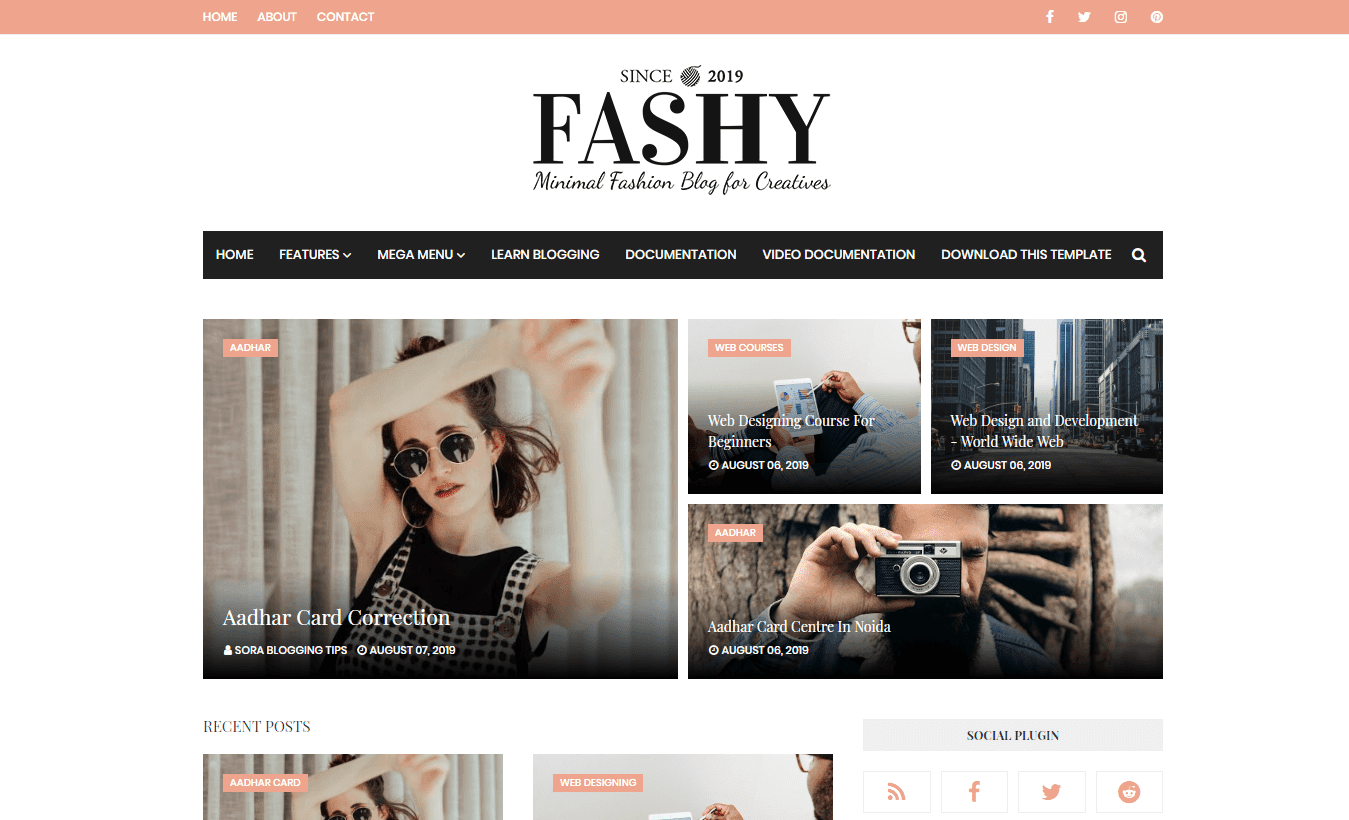
    Fashy Blogger Template adalah tema majalah mode yang menakjubkan dan bergaya. Template Blog Blogger Mode ini hadir dengan Desain yang sudah jadi dan jika Anda tidak ingin mendesain sendiri, Anda dapat menyewa pengembang situs web di mumbai. Ini memiliki desain interaktif dan konsep yang ramah pengguna.
    ahmadnurhadirmw - Fashy Blogger Template adalah tema majalah mode yang menakjubkan dan bergaya. Template Blog Blogger Mode ini hadir dengan Desain yang sudah jadi dan jika Anda tidak ingin mendesain sendiri, Anda dapat menyewa pengembang situs web di mumbai. Ini memiliki desain interaktif dan konsep yang ramah pengguna. Ini adalah tema yang sepenuhnya responsif, dengan struktur kode yang sangat dioptimalkan dan waktu pemuatan yang cepat. Didesain khusus untuk blog mode, Sangat mudah untuk menyesuaikan dan juga dirancang untuk blog pribadi seperti Blog Perjalanan, Blog Majalah Mode, Blog Mode, Blog Perjalanan, Blog Resep Makanan, Blog Gaya Hidup, Blog Petualangan, Blog Tek, Blog Tek, dan blog keren lainnya Situs web blog. Ini memiliki banyak fitur seperti menu dropdown, posting fitur bergaya, desain bersih dan minimal, dll!

    Template ini untuk blogger google bukan untuk blog atau wordpress, google blogger ini didesain untuk para orang-orang kretive di seluruh dunia. template blogger ini free dan freemium, template blogger premium, template blogger responsive, template blogger simple, template blogger gratis, blogger google ads, template blogger seo.

    Basic Setup

    1. Template Installation
    2. Logo Setup
    3. Template Setting
    4. Shortcodes & Markups
    5. Buat Sitemap

    Templates Blogger Fashy:

    1. 100% Murni Responsif - PERIKSA
    2. Google Validasi - PERIKSA
    3. Ramah Ponsel - PERIKSA
    4. Memuat Kecepatan - PERIKSA
    5. Halaman Galat - PERIKSA
    6. Dokumentasi Lengkap - PERIKSA
    7. Baca Lebih Lanjut Dengan Gambar Kecil
    8. Widget Pos Populer Kustom
    9. Desain Minimal & Bersih
    10. Widget Komentar Khusus
    11. Multi Dropdown
    12. 2 kolom
    13. Widget Sosial Bergaya
    14. Pos terkait
    15. Fitur Lebih Keren

    Fitur Unlock

    • Hapus Kredit Footer
    • Layanan Pengaturan Blog
    • Tidak Ada Script Terenkripsi
    • Dukungan Premium 7 Hari
    • Untuk Domain Tidak Terbatas
    • Pembaruan Templat Seumur Hidup
    • Versi diperpanjang
    • Anda akan mendapatkan akses penuh dari templat dalam versi yang diperluas.
    • Addons HEAD

    Review

    Templates Fashy ini sendiri adalah template untuk personal dan bisnis, yang dimana di khususkan penggunanya adalah laki-laki dan perempuan Template yang mengesankan, profesional, responsif, terbaik yang sangat cocok untuk situs web Berita, Blogger Pribadi, Majalah, Toko. Ini adalah Template Blogger SEO yang responsif dan cantik, Pilihan sempurna untuk mode & tata letak blog minimalis, blog OOTD, blog pribadi, blog Niche, blog otoritas, atau semua jenis blog kreatif atau majalah sederhana.

    Beranda dirancang untuk multi guna, blog Otoritas, Agensi, Aplikasi, Arsitek, Toko Roti, Kotak, Desain perbatasan, Bisnis, Amal, Perguruan Tinggi, Konstruksi, Perusahaan, Pendidikan, Hosting, Industri, Majalah, Medis, Pribadi, Portofolio, Restoran, Sekolah, Toko, Perjalanan, Universitas, Pernikahan dll.

    Saya disini hanya mendecode script yang di encode tidak ada link atau credit yang di hapus, tinggal user saja yang memilih. jika ada link/credit yang di hapus bukan tanggung jawab kami, selaku admin Themeploit. Harap Hargai Kerja keras Developers jika tidak ada mereka blog anda kumel ☺. jika kalian ingin dihargai silakan langsung beli templatenya ke developernya. blogspot templates anime blogger adsense template amp awesome best for affiliate free art bootstrap builder business blank berita bisnis gratis berbayar bitcoin beautiful buy 2018 book ban hang cooking cute com company profile create cool html code custom codecanyon car chuẩn seo cá nhân đẹp 2017 công ty download design default designer website simple magazine education ecommerce exo examples photography portfolio news video theme fast loading food software games generator friendly responsive keren grid google game giới thiệu sản phẩm how to health high ctr hello kitty horror html5 hotel hacking handphone indonesia iklan info image jualan online jalantikus job kopi manis katalog kawaii landing page layout là gì listing pages livros loja virtual maker mobile minimalist movie minisite mas sugeng murah music mirip wordpress menu minion newspaper new nội thất newspapers nhà đất shop one store olshop column premium pinterest professional post personal perusahaan phim quảng cáo 2019 ringan real estate travel tumblr toko terbaik terbaru themexpose tin tức cực tiếng việt thủ thuật untuk sekolah web daftar organisasi portofolio kantor unique upload viral vintage youtube viet nam variables hóa vietdesigner wallpaper wedding with slider xml yang yellow blog optimized approval ready jepang tokyo ghoul boy fansub terlengkap naruto tema bertema
    Fashy Blogger Template adalah tema majalah mode yang menakjubkan dan bergaya. Template Blog Blogger Mode ini hadir dengan Desain yang sudah jadi dan jika Anda tidak ingin mendesain sendiri, Anda dapat menyewa pengembang situs web di mumbai. Ini memiliki desain interaktif dan konsep yang ramah pengguna.
    Disini kamu hanya perlu melihat opsi 2 button di bawah lihat yang Code Premium jika button ini mengarah ke Paste2.org maka yang kamu perlukan Download Template (Button ke-2), jika tombol button Code Premium mengarah ke File maka itulah download File dan sekaligus sudah di patch kode encryptednya tinggal install ke Bloggeralert-info

    Jika Memiliki Kendala Tolong Berkomentar.alert-info
    contact-form

    Wednesday, September 18, 2019

    How To Setup Zeek Blogger Template [Way2Themes]

    Zeek Blogger Template is a minimal & clean blogger theme loaded with various features like, dropdown menu, featured post, recent post, random post etc. Zeek is equipped with various of widgets which will help you to publish your blog more professionally. To make it easy for you we have published this detailed documentation, so that you can setup your blog correctly.
    You have made a good decision by choosing our template. You can check the live demo or download the template through the button below and also Please Read this documentation carefully in order to set up your blog and please note that there’s no support for free users.

    Video Documentation

    You can check this below video to understand the setup process much more easily, just click the below image to watch the video directly on YouTube, or click this link - How To Setup Zeek Blogger Template - Way2Themes


    Main Menu/DropDown/Multi DropDown

    Access your blog Layout > click Edit icon on Main Menu widget.

    Normal Link : Dropdown
    Sub Link: _Multi Dropdown (before the link add "_") 1 underscore
    Sub Link 2: __Dropdown 1 (before the link add "__") 2 underscore

    Hot Posts

    Access your blog Layout > click Add a Gadget > HTML/JavaScript on Hot Posts section and follow the instructions below.

    Shortcode: Labelrecent or random/hot-posts

    Example: Technology/hot-posts


    Main Posts

    Access your blog Layout > click Edit Icon on > Main Posts/Blog Posts.


    Post Layouts

    Left Sidebar: Inside the post add the text left-sidebar and add the style Strikethrough
    Full Width: Inside the post add the text full-width and add the style Strikethrough
    Right Sidebar: Inside the post add the text right-sidebar and add the style Strikethrough

    Post List Widget

    Access your blog Layout > click Add a Gadget > HTML/JavaScript on Sidebar or Footer section and follow the instructions below.

    Shortcode: Results number/Labelrecent or random/post-list

    Label Posts: 3/Technology/post-list
    Recent Posts: 3/recent/post-list
    Random Posts: 3/random/post-list

    Social Widget (Sidebar)

    Access your blog Layout > click Edit icon on Social Widget widget.

    Icons Avaliables { blogger, facebook, twitter, gplus, rss, youtube, skype, stumbleupon, tumblr, vk, stack-overflow, github, linkedin, dribbble, soundcloud, behance, digg, instagram, pinterest, twitch, delicious, codepen, reddit, whatsapp, snapchat, email }

    Theme Options

    01 - Boxed Version

    Access your blog Layout > click Edit icon on Boxed Version widget.

    In New Site Name add boxedVersion, in New Site URL add true or false, after click on save button.


    02 - Default Variables

     Access your blog Layout > click Edit icon on Default Variables widget.

    Post Per Page: In New Site Name add postPerPage, in New Site URL add the number of results, it should be the same as the posts from the home page, after click on save button.

    Fixed Sidebar: In New Site Name add fixedSidebar, in New Site URL  add true or false, after click on save button.

    Comments System: In New Site Name add commentsSystem, in New Site URL add the comments sytem type {bloggerdisqusfacebook or hide}, after click on save button.

    Disqus Shortname: In New Site Name add disqusShortname, in New Site URL add your disqus comment system shortname, after click on save button.

    Facebook Page Plugin 

    Access your blog Layout > click Add a Gadget > HTML/JavaScript on Sidebar or Footer section, and paste the code below.

    <center><div class="fb-page" data-href="https://www.facebook.com/way2themes" data-width="360" data-small-header="false" data-adapt-container-width="true" data-hide-cover="false"  data-show-facepile="true"></div></center>

    Note: In Attribute data-href replace the link per your facebook page url.

    Customizing Your Template

    Access your blog Theme > click Customize button.

    Here you can change the background (boxed version), and apply pre-defined colors


    Clicking Advanced You will see the official option to change the Main Colors

    Installation And Custom Services

    We provide plenty of templates for free but if you want something unique for your blog then let us create a unique design for your blog, Just tell us your needs and we will convert your dream design into reality. We also Provide Blogger Template Installation Service. Our Installation service gives you a simple, quick and secure way of getting your template setup without hassle.

    Tuesday, August 6, 2019

    How To Setup Fashy Blogger Template [Way2Themes]

    Fashy Blogger Template is a simple fashion magazine template loaded with various features like, dropdown menu, mega menu, featured post, recent post, random post etc. Fashy is equipped with various of widgets which will help you to publish your blog more professionally. To make it easy for you we have published this detailed documentation, so that you can setup your blog correctly.
    You have made a good decision by choosing our template. You can check the live demo or download the template through the button below and also Please Read this documentation carefully in order to set up your blog and please note that there’s no support for free users.

    Basic Setup

    1. Template Installation
    2. Logo Setup
    3. Template Setting
    4. Shortcodes & Markups
    5. Create Sitemap

    Video Documentation

    You can check this below video to understand the setup process much more easily, just click the below image to watch the video directly on YouTube, or click this link - How To Setup Fashy Blogger Template - Way2Themes


    Top Navigation

    Access your blog Layout > click Edit icon on Top Navigation or Footer Menu widget.


    Social Top

    Access your blog Layout > click Edit icon on Social Top widget.

    Icons Avaliables { facebook, twitter, gplus, rss, youtube, skype, stumbleupon, tumblr, vk, stack-overflow, github, linkedin, dribbble, soundcloud, behance, digg, instagram, pinterest, twitch, delicious, codepen, reddit, whatsapp, snapchat, email }

    Main Menu/DropDown/Multi DropDown/Mega Menu

    Access your blog Layout > click Edit icon on Main Menu widget.

    Normal Link : Features
    Sub Link: _Sub Link 1.0 (before the link add "_") 1 underscore
    Sub Link 2: __Sub Link 1.1 (before the link add "__") 2 underscore
    Mega Shortcode by Label: Technology/mega-menu
    Mega Shortcode by Recent: recent/mega-menu
    Mega Shortcode by Random: random/mega-menu

    Hot Posts

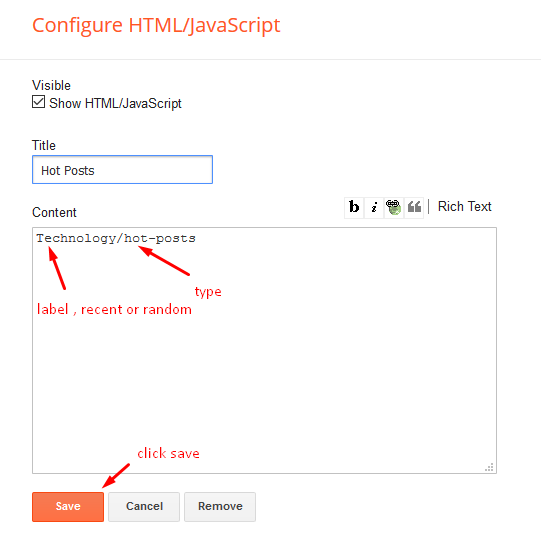
    Access your blog Layout > click Add a Gadget > HTML/JavaScript on Hot Posts section and follow the instructions below.

    Shortcode: Labelrecent or random/hot-posts

    Example: Technology/hot-posts


    Main Posts

    Access your blog Layout > click Edit Icon on > Main Posts/Blog Posts.


    Post Layouts

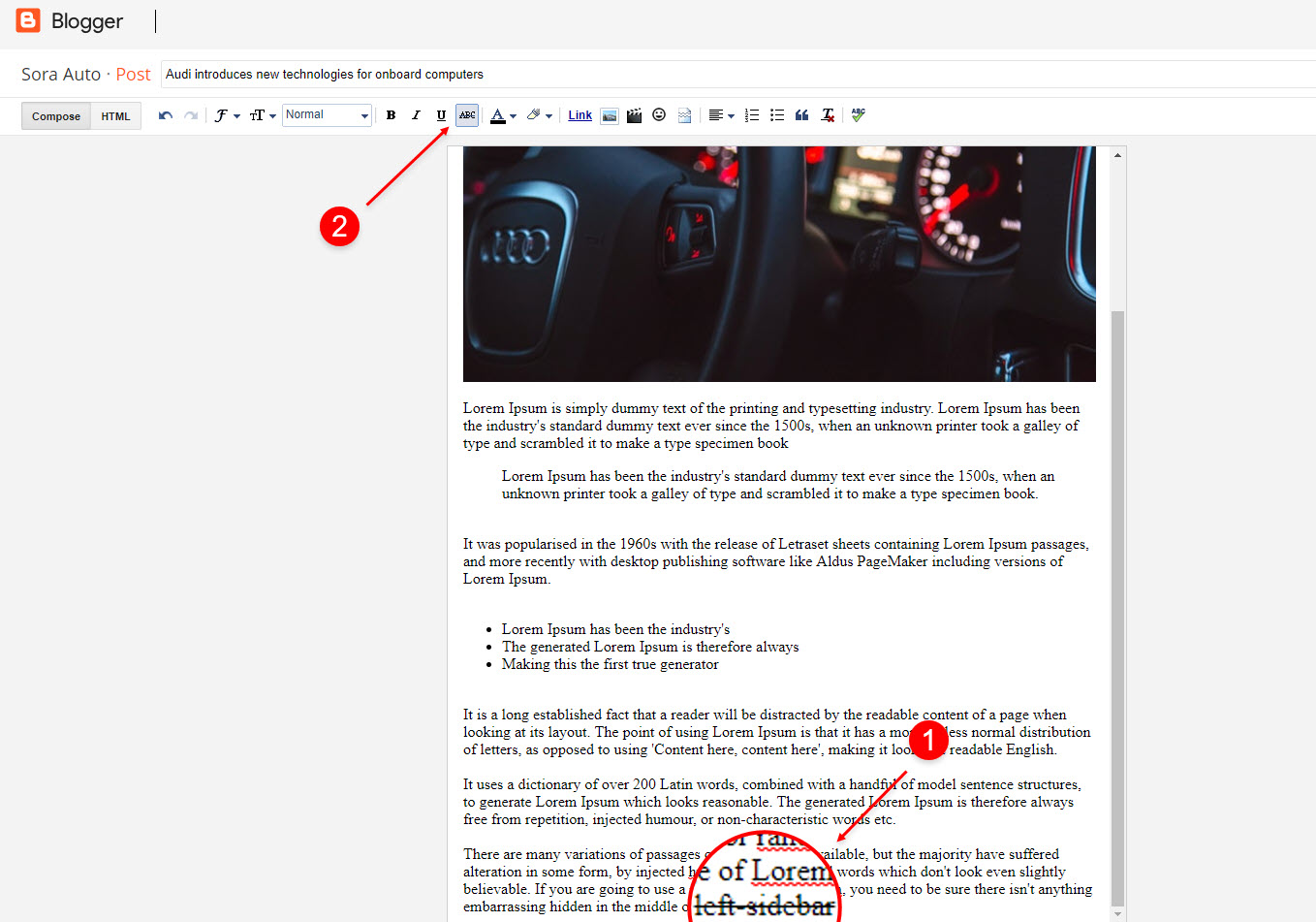
    Left Sidebar: Inside the post add the text left-sidebar and add the style Strikethrough
    Full Width: Inside the post add the text full-width and add the style Strikethrough
    Right Sidebar: Inside the post add the text right-sidebar and add the style Strikethrough


    Post List Widget

    Access your blog Layout > click Add a Gadget > HTML/JavaScript on Sidebar or Footer section and follow the instructions below.

    Shortcode: Results number/Labelrecent or random/post-list

    Label Posts: 3/Technology/post-list
    Recent Posts: 3/recent/post-list
    Random Posts: 3/random/post-list


    Social Widget (Sidebar)

    Access your blog Layout > click Edit icon on Social Widget widget.

    Icons Avaliables { blogger, facebook, twitter, gplus, rss, youtube, skype, stumbleupon, tumblr, vk, stack-overflow, github, linkedin, dribbble, soundcloud, behance, digg, instagram, pinterest, twitch, delicious, codepen, reddit, whatsapp, snapchat, email }

    Theme Options

    01 - Boxed Version

    Access your blog Layout > click Edit icon on Boxed Version widget.

    In New Site Name add boxedVersion, in New Site URL add true or false, after click on save button.


    02 - Default Variables

     Access your blog Layout > click Edit icon on Default Variables widget.

    Post Per Page: In New Site Name add postPerPage, in New Site URL add the number of results, it should be the same as the posts from the home page, after click on save button.

    Fixed Sidebar: In New Site Name add fixedSidebar, in New Site URL  add true or false, after click on save button.

    Comments System: In New Site Name add commentsSystem, in New Site URL add the comments sytem type {bloggerdisqusfacebook or hide}, after click on save button.

    Disqus Shortname: In New Site Name add disqusShortname, in New Site URL add your disqus comment system shortname, after click on save button.

    Facebook Page Plugin 

    Access your blog Layout > click Add a Gadget > HTML/JavaScript on Sidebar or Footer section, and paste the code below.

    <center><div class="fb-page" data-href="https://www.facebook.com/way2themes" data-width="360" data-small-header="false" data-adapt-container-width="true" data-hide-cover="false"  data-show-facepile="true"></div></center>

    Note: In Attribute data-href replace the link per your facebook page url.


    Customizing Your Template

    Access your blog Theme > click Customize button.

    Here you can change the background (boxed version), and apply pre-defined colors


    Clicking Advanced You will see the official option to change the Main Colors

    Installation And Custom Services

    We provide plenty of templates for free but if you want something unique for your blog then let us create a unique design for your blog, Just tell us your needs and we will convert your dream design into reality. We also Provide Blogger Template Installation Service. Our Installation service gives you a simple, quick and secure way of getting your template setup without hassle.