Friday, November 15, 2019

How To Setup Fanster Blogger Template [OmTemplates]
Fanster Blogger template is an amazingly looking and elegantly built clean blogging blogger theme that is tailored with perfection and brings simplicity into your blog. Fanster is equipped with various of widgets which will help you to publish your blog more professionally. To make it easy for you we have published this detailed documentation, so that you can setup your blog correctly.
You have made a good decision by choosing our template. You can check the live demo or download the template through the button below and also Please Read this documentation carefully in order to set up your blog and please note that there’s no support for free users.

Basic Setup

  1. Template Installation
  2. Logo Setup
  3. Template Setting
  4. Shortcodes & Markups
  5. Create Sitemap

Video Documentation

You can check this below video to understand the setup process much more easily, just click the below image to watch the video directly on YouTube, or click this link - How To Setup Fanster Blogger Template - OmTemplates


Social Top/Footer

On Blogger Dashbord Click Theme
Click Edit HTML
(Social) Scroll down and Find this Code :
<div class='social-top'>
<div class='social'>
<ul class='icon'>
<li><a class='pinterest' expr:href=' &quot;http://pinterest.com/pin/create/button/?url=&quot; + data:post.url + &quot;&amp;media=&quot; + data:post.firstImageUrl + &quot;&amp;description=&quot; + data:post.snippet' rel='nofollow' target='_blank' title='pinterest'><i class='fa fa-pinterest'/></a></li>

<li><a class='facebook' expr:href='&quot;http://www.facebook.com/sharer.php?u=&quot; + data:post.url + &quot;&amp;title=&quot;+ data:post.title' rel='nofollow' target='_blank' title='facebook'><i class='fa fa-facebook'/></a></li>


<li><a class='twitter' expr:href='&quot;http://twitter.com/share?url=&quot; + data:post.url + &quot;&amp;title=&quot; + data:post.title ' rel='nofollow' target='_blank' title='twitter'><i class='fa fa-twitter'/></a></li>

<li><a class='linkedin' expr:href='&quot;http://www.linkedin.com/shareArticle?url=&quot; + data:post.url + &quot;&amp;title=&quot;+ data:post.title' rel='nofollow' target='_blank' title='linkedin'><i class='fa fa-linkedin'/></a></li>

</ul>
</div>
</div>
Change # with your desired url. 

Main Menu

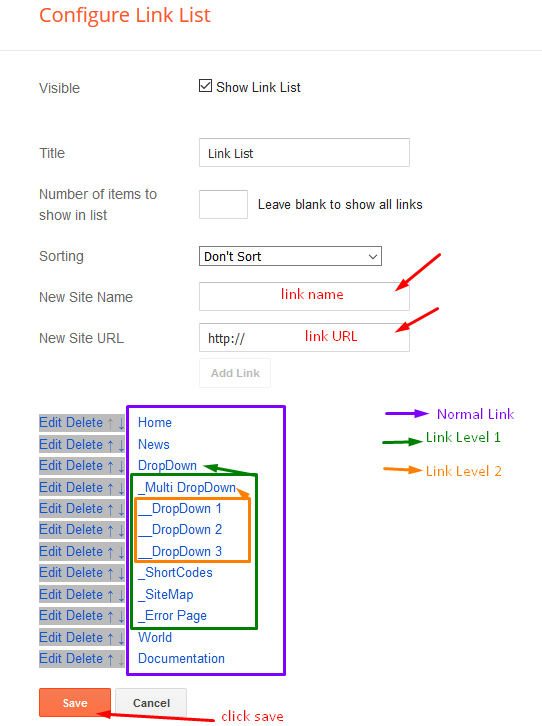
Access your blog Layout > click Edit icon on Main Menu widget.

Normal Link : Features
Link Level 1: _Sub Link 1.0 (before the link add "_") 1 underscore
Link Level 2: __Sub Link 1.1 (before the link add "__") 2 underscore
Featured Slider

Access your blog Layout > click Add a Gadget > HTML/JavaScript on Featured Posts Section, and then add one of the following

Recent Posts: <div class="latestposts" data-no="5"></div>
Label / Tag Ex<div class="tagpost" data-label="Break" data-no="5"></div>

Post Author Box

Access your blog theme> search for this below code.
<p>Hello, my name is OmTemplates. I am a professional designer and developer from BLA BLA Doing business like this takes much more effort than doing your own business at home the curse of travelling, worries about making train connections, bad and irregular food.</p>
change the value with your desired details.

Facebook Page Plugin:

<center><div class="fb-padding"><div id="fb-root"></div>
<script>(function(d, s, id) {
  var js, fjs = d.getElementsByTagName(s)[0];
  if (d.getElementById(id)) return;
  js = d.createElement(s); js.id = id;
  js.src = "//connect.facebook.net/pt_BR/sdk.js#xfbml=1&version=v2.3&appId=1395743857335531";
  fjs.parentNode.insertBefore(js, fjs);
}(document, 'script', 'facebook-jssdk'));</script>
<div class="fb-page" data-href="https://www.facebook.com/omtemplates" data-width="280" data-height="230" data-hide-cover="false" data-show-facepile="true" data-show-posts="false"><div class="fb-xfbml-parse-ignore"></div></div></div></center>
or you can follow this tutorial if above method won't work

Installation And Custom Services

We provide plenty of templates for free but if you want something unique for your blog then let us create a unique design for your blog, Just tell us your needs and we will convert your dream design into reality. We also Provide Blogger Template Installation Service. Our Installation service gives you a simple, quick and secure way of getting your template setup without hassle.
Wednesday, October 16, 2019

Download Template Blog Premium Gratis Blogspot Google Cleator Dari Omtemplates
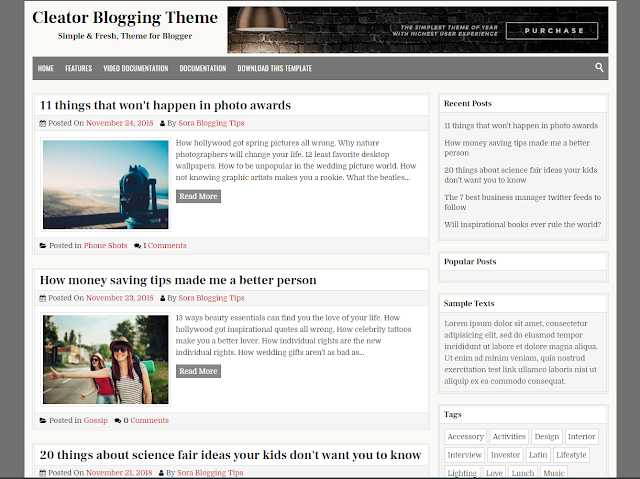
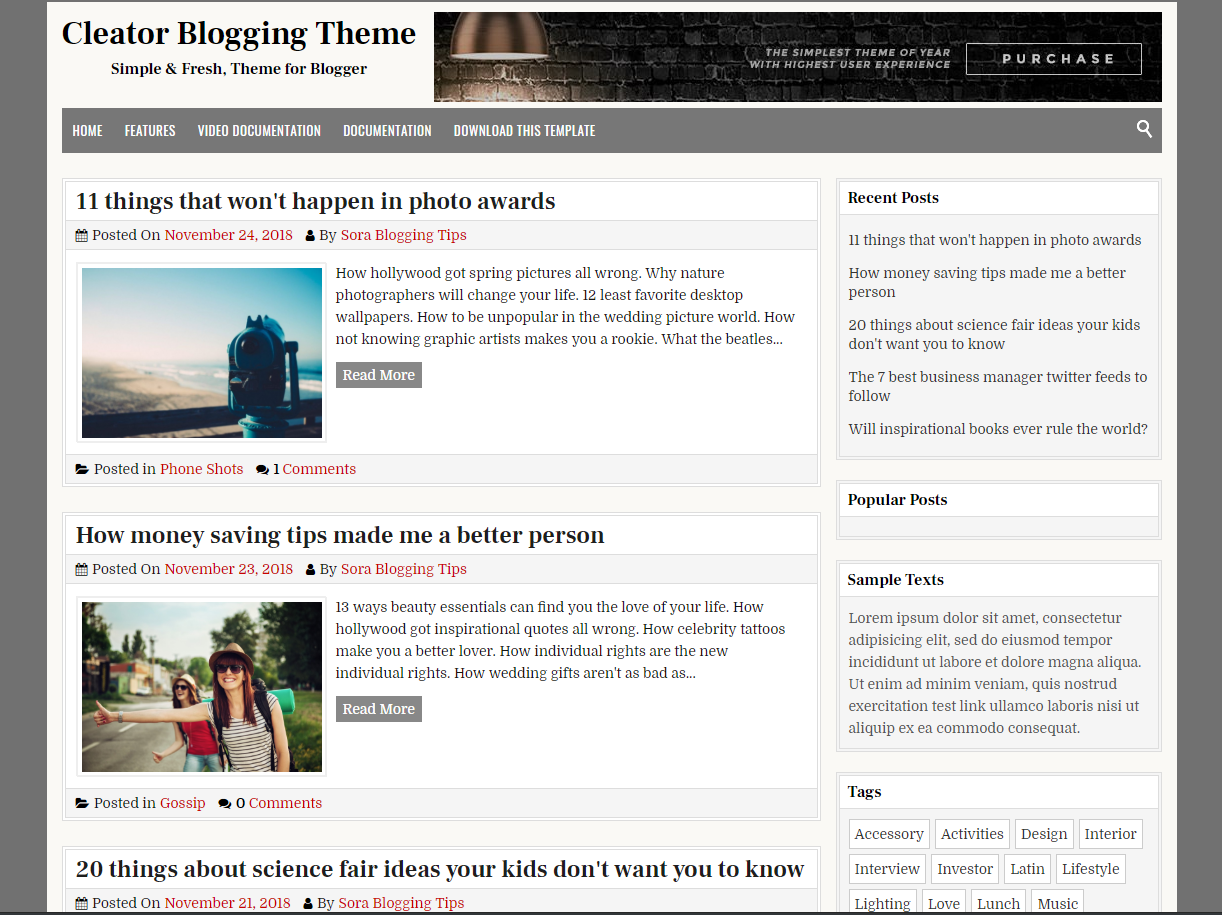
Cleator Blogger Template adalah Theme Blogger yang bersih dan elegan, dibuat untuk mereka yang ingin menjadi blogger dan ingin mempromosikan media yang paling menarik
ahmadnurhadirmw - Cleator Blogger Template adalah Theme Blogger yang bersih dan elegan, dibuat untuk mereka yang ingin menjadi blogger dan ingin mempromosikan media yang paling menarik. Cleator adalah halaman yang dipoles dengan sangat baik & halaman seimbang yang indah menjadikannya template yang ideal untuk hampir semua jenis blog.! Berikut ini adalah beberapa fitur utama dari Template Blogger Cleator.

Template ini untuk blogger google bukan untuk blog atau wordpress, google blogger ini didesain untuk para orang-orang kretive di seluruh dunia. template blogger ini free dan freemium, template blogger premium, template blogger responsive, template blogger simple, template blogger gratis, blogger google ads, template blogger seo.

Basic Setup

  1. Template Installation
  2. Logo Setup
  3. Template Setting
  4. Shortcodes & Markups
  5. Buat Sitemap

Templates Blogger Cleator:

  1. 100% Murni Responsif - PERIKSA
  2. Google Validasi - PERIKSA
  3. Ramah Ponsel - PERIKSA
  4. Memuat Kecepatan - PERIKSA
  5. Halaman Galat - PERIKSA
  6. Dokumentasi Lengkap - PERIKSA
  7. Baca Lebih Lanjut Dengan Gambar Kecil
  8. Widget Pos Populer Kustom
  9. Desain Minimal & Bersih
  10. Widget Komentar Khusus
  11. Multi Dropdown
  12. 2 kolom
  13. Widget Sosial Bergaya
  14. Pos terkait
  15. Fitur Lebih Keren

Review

Templates Cleator ini sendiri adalah template untuk personal dan bisnis, yang dimana di khususkan penggunanya adalah laki-laki dan perempuan Template yang mengesankan, profesional, responsif, terbaik yang sangat cocok untuk situs web Berita, Blogger Pribadi, Majalah, Toko. Ini adalah Template Blogger SEO yang responsif dan cantik, Pilihan sempurna untuk mode & tata letak blog minimalis, blog OOTD, blog pribadi, blog Niche, blog otoritas, atau semua jenis blog kreatif atau majalah sederhana.

Beranda dirancang untuk multi guna, blog Otoritas, Agensi, Aplikasi, Arsitek, Toko Roti, Kotak, Desain perbatasan, Bisnis, Amal, Perguruan Tinggi, Konstruksi, Perusahaan, Pendidikan, Hosting, Industri, Majalah, Medis, Pribadi, Portofolio, Restoran, Sekolah, Toko, Perjalanan, Universitas, Pernikahan dll.

Saya disini hanya mendecode script yang di encode tidak ada link atau credit yang di hapus, tinggal user saja yang memilih. jika ada link/credit yang di hapus bukan tanggung jawab kami, selaku admin Themeploit. Harap Hargai Kerja keras Developers jika tidak ada mereka blog anda kumel ☺. jika kalian ingin dihargai silakan langsung beli templatenya ke developernya. Responsive Blogger Template responsive blogger template 2019 templates free download with slider 2018 ads ready bootstrap gratis portfolio btemplates education newspaper - best simple adsense adamz lycoris v1 1 alt apriezt axact infinite amp android seo google what is a amazin multipurpose areda hubspot purple html goomsite bcorporate blush bmag magazine blog fast blanter nova viralisme for viral news brand mag parallax blogmag business socio and buzz clean create one column cute gridz & minimal flex minimalist elegant 2 voux chicmag squid cody chuẩn minima colored copyblogger-v2 oliver premium digizena video youtube dens deco r-shop ecommerce sativa default everyday egnova nulled full gallery grid gridisme keren invert go johny view genova gravity hotmag how to make html5 invision pro indonesia infinity 3 innovative – ijonkz-responsive-magazine news-blogger-template juragan zura janai new wuss job linezap n light loading vienna lite load livia luna mobile magone movie magnews mocca masqoli web monalisa friendly magma magpress flat sora trends-news magazine-responsive-blogger-template trends news/magazine newsly net page online shop toko origin of mega mag-magazine news-responsive-blogger-template personal picshots porto photosout phantom myblog proxima palki warm mag-premium-responsive-blogger-template revoltify radja red xcode supermedium featured random rifqi-responsive-blogger-template rifqiy-responsive-magazine 2017 simplify straight terbaik terbaru tech timeline videotube vikka vintage wordpress white width xml
Cleator Blogger Template adalah Theme Blogger yang bersih dan elegan, dibuat untuk mereka yang ingin menjadi blogger dan ingin mempromosikan media yang paling menarik
Disini kamu hanya perlu melihat opsi 2 button di bawah lihat yang Code Premium jika button ini mengarah ke Paste2.org maka yang kamu perlukan Download Template (Button ke-2), jika tombol button Code Premium mengarah ke File maka itulah download File dan sekaligus sudah di patch kode encryptednya tinggal install ke Bloggeralert-info

Jika Memiliki Kendala Tolong Berkomentar.alert-info
contact-form
Download Template Blog Premium Gratis Blogspot Google PureMag Dari Omtemplates
Puremag Blogger Template adalah Tema Blogger yang bersih dan elegan, sepenuhnya responsif, tema blogging 2 kolom.
ahmadnurhadirmw - Puremag Blogger Template adalah Tema Blogger yang bersih dan elegan, sepenuhnya responsif, tema blogging 2 kolom. Ini memiliki banyak opsi tema untuk menyesuaikan berbagai aspek tema dan memiliki ringkasan posting bersih, tata letak lebar penuh, area widget header, sidebar kanan, area widget footer 4 kolom, tombol sosial dan banyak lagi.

Template ini untuk blogger google bukan untuk blog atau wordpress, google blogger ini didesain untuk para orang-orang kretive di seluruh dunia. template blogger ini free dan freemium, template blogger premium, template blogger responsive, template blogger simple, template blogger gratis, blogger google ads, template blogger seo.

Basic Setup

  1. Template Installation
  2. Logo Setup
  3. Template Setting
  4. Shortcodes & Markups
  5. Buat Sitemap

Templates Blogger PureMag:

  1. 100% Murni Responsif - PERIKSA
  2. Google Validasi - PERIKSA
  3. Ramah Ponsel - PERIKSA
  4. Memuat Kecepatan - PERIKSA
  5. Halaman Galat - PERIKSA
  6. Dokumentasi Lengkap - PERIKSA
  7. Baca Lebih Lanjut Dengan Gambar Kecil
  8. Widget Pos Populer Kustom
  9. Desain Minimal & Bersih
  10. Widget Komentar Khusus
  11. Multi Dropdown
  12. 2 kolom
  13. Widget Sosial Bergaya
  14. Pos terkait
  15. Fitur Lebih Keren

Review

Templates PureMag ini sendiri adalah template untuk personal dan bisnis, yang dimana di khususkan penggunanya adalah laki-laki dan perempuan Template yang mengesankan, profesional, responsif, terbaik yang sangat cocok untuk situs web Berita, Blogger Pribadi, Majalah, Toko. Ini adalah Template Blogger SEO yang responsif dan cantik, Pilihan sempurna untuk mode & tata letak blog minimalis, blog OOTD, blog pribadi, blog Niche, blog otoritas, atau semua jenis blog kreatif atau majalah sederhana.

Beranda dirancang untuk multi guna, blog Otoritas, Agensi, Aplikasi, Arsitek, Toko Roti, Kotak, Desain perbatasan, Bisnis, Amal, Perguruan Tinggi, Konstruksi, Perusahaan, Pendidikan, Hosting, Industri, Majalah, Medis, Pribadi, Portofolio, Restoran, Sekolah, Toko, Perjalanan, Universitas, Pernikahan dll.

Saya disini hanya mendecode script yang di encode tidak ada link atau credit yang di hapus, tinggal user saja yang memilih. jika ada link/credit yang di hapus bukan tanggung jawab kami, selaku admin Themeploit. Harap Hargai Kerja keras Developers jika tidak ada mereka blog anda kumel ☺. jika kalian ingin dihargai silakan langsung beli templatenya ke developernya. Responsive Blogger Template responsive blogger template 2019 templates free download with slider 2018 ads ready bootstrap gratis portfolio btemplates education newspaper - best simple adsense adamz lycoris v1 1 alt apriezt axact infinite amp android seo google what is a amazin multipurpose areda hubspot purple html goomsite bcorporate blush bmag magazine blog fast blanter nova viralisme for viral news brand mag parallax blogmag business socio and buzz clean create one column cute gridz & minimal flex minimalist elegant 2 voux chicmag squid cody chuẩn minima colored copyblogger-v2 oliver premium digizena video youtube dens deco r-shop ecommerce sativa default everyday egnova nulled full gallery grid gridisme keren invert go johny view genova gravity hotmag how to make html5 invision pro indonesia infinity 3 innovative – ijonkz-responsive-magazine news-blogger-template juragan zura janai new wuss job linezap n light loading vienna lite load livia luna mobile magone movie magnews mocca masqoli web monalisa friendly magma magpress flat sora trends-news magazine-responsive-blogger-template trends news/magazine newsly net page online shop toko origin of mega mag-magazine news-responsive-blogger-template personal picshots porto photosout phantom myblog proxima palki warm mag-premium-responsive-blogger-template revoltify radja red xcode supermedium featured random rifqi-responsive-blogger-template rifqiy-responsive-magazine 2017 simplify straight terbaik terbaru tech timeline videotube vikka vintage wordpress white width xml
Puremag Blogger Template adalah Tema Blogger yang bersih dan elegan, sepenuhnya responsif, tema blogging 2 kolom.
Disini kamu hanya perlu melihat opsi 2 button di bawah lihat yang Code Premium jika button ini mengarah ke Paste2.org maka yang kamu perlukan Download Template (Button ke-2), jika tombol button Code Premium mengarah ke File maka itulah download File dan sekaligus sudah di patch kode encryptednya tinggal install ke Bloggeralert-info

Jika Memiliki Kendala Tolong Kontak saya.alert-info
Tolong Juga Agar Berkomentar Sopan :)alert-warning
contact-form

Sunday, October 13, 2019

Download Template Blog Premium Gratis Blogspot Google Gymster Dari Omtemplates
Gymster Blogger Template adalah tema blogger 3 kolom yang indah, responsif, 100% untuk angkat besi atau situs web kebugaran. Templat Gymster Blogger memiliki pos ramah seluler, 2 bilah samping kanan, 2 menu navigasi, tombol sosial dan berbagi pos, widget tajuk dan banyak lagi.
ahmadnurhadirmw - Gymster Blogger Template adalah tema blogger 3 kolom yang indah, responsif, 100% untuk angkat besi atau situs web kebugaran. Templat Gymster Blogger memiliki pos ramah seluler, 2 bilah samping kanan, 2 menu navigasi, tombol sosial dan berbagi pos, widget tajuk dan banyak lagi.

Template ini untuk blogger google bukan untuk blog atau wordpress, google blogger ini didesain untuk para orang-orang kretive di seluruh dunia. template blogger ini free dan freemium, template blogger premium, template blogger responsive, template blogger simple, template blogger gratis, blogger google ads, template blogger seo.

Basic Setup

  1. Template Installation
  2. Logo Setup
  3. Template Setting
  4. Shortcodes & Markups
  5. Buat Sitemap

Templates Blogger Gymster:

  1. 100% Murni Responsif - PERIKSA
  2. Google Validasi - PERIKSA
  3. Ramah Ponsel - PERIKSA
  4. Memuat Kecepatan - PERIKSA
  5. Halaman Galat - PERIKSA
  6. Dokumentasi Lengkap - PERIKSA
  7. Baca Lebih Lanjut Dengan Gambar Kecil
  8. Widget Pos Populer Kustom
  9. Desain Minimal & Bersih
  10. Widget Komentar Khusus
  11. Multi Dropdown
  12. 2 kolom
  13. Widget Sosial Bergaya
  14. Pos terkait
  15. Fitur Lebih Keren

Review

Templates Gymster ini sendiri adalah template untuk personal dan bisnis, yang dimana di khususkan penggunanya adalah laki-laki dan perempuan Template yang mengesankan, profesional, responsif, terbaik yang sangat cocok untuk situs web Berita, Blogger Pribadi, Majalah, Toko. Ini adalah Template Blogger SEO yang responsif dan cantik, Pilihan sempurna untuk mode & tata letak blog minimalis, blog OOTD, blog pribadi, blog Niche, blog otoritas, atau semua jenis blog kreatif atau majalah sederhana.

Beranda dirancang untuk multi guna, blog Otoritas, Agensi, Aplikasi, Arsitek, Toko Roti, Kotak, Desain perbatasan, Bisnis, Amal, Perguruan Tinggi, Konstruksi, Perusahaan, Pendidikan, Hosting, Industri, Majalah, Medis, Pribadi, Portofolio, Restoran, Sekolah, Toko, Perjalanan, Universitas, Pernikahan dll.

Saya disini hanya mendecode script yang di encode tidak ada link atau credit yang di hapus, tinggal user saja yang memilih. jika ada link/credit yang di hapus bukan tanggung jawab kami, selaku admin Themeploit. Harap Hargai Kerja keras Developers jika tidak ada mereka blog anda kumel ☺. jika kalian ingin dihargai silakan langsung beli templatenya ke developernya. Responsive Blogger Template responsive blogger template 2019 templates free download with slider 2018 ads ready bootstrap gratis portfolio btemplates education newspaper - best simple adsense adamz lycoris v1 1 alt apriezt axact infinite amp android seo google what is a amazin multipurpose areda hubspot purple html goomsite bcorporate blush bmag magazine blog fast blanter nova viralisme for viral news brand mag parallax blogmag business socio and buzz clean create one column cute gridz & minimal flex minimalist elegant 2 voux chicmag squid cody chuẩn minima colored copyblogger-v2 oliver premium digizena video youtube dens deco r-shop ecommerce sativa default everyday egnova nulled full gallery grid gridisme keren invert go johny view genova gravity hotmag how to make html5 invision pro indonesia infinity 3 innovative – ijonkz-responsive-magazine news-blogger-template juragan zura janai new wuss job linezap n light loading vienna lite load livia luna mobile magone movie magnews mocca masqoli web monalisa friendly magma magpress flat sora trends-news magazine-responsive-blogger-template trends news/magazine newsly net page online shop toko origin of mega mag-magazine news-responsive-blogger-template personal picshots porto photosout phantom myblog proxima palki warm mag-premium-responsive-blogger-template revoltify radja red xcode supermedium featured random rifqi-responsive-blogger-template rifqiy-responsive-magazine 2017 simplify straight terbaik terbaru tech timeline videotube vikka vintage wordpress white width xml
Gymster Blogger Template adalah tema blogger 3 kolom yang indah, responsif, 100% untuk angkat besi atau situs web kebugaran. Templat Gymster Blogger memiliki pos ramah seluler, 2 bilah samping kanan, 2 menu navigasi, tombol sosial dan berbagi pos, widget tajuk dan banyak lagi.
Disini kamu hanya perlu melihat opsi 2 button di bawah lihat yang Code Premium jika button ini mengarah ke Paste2.org maka yang kamu perlukan Download Template (Button ke-2), jika tombol button Code Premium mengarah ke File maka itulah download File dan sekaligus sudah di patch kode encryptednya tinggal install ke Bloggeralert-info

Jika Memiliki Kendala Tolong Kontak saya atau jika Dari Pihak Developer tidak suka silakan Kontak Di bawah ini (Sertakan Link Postingan yang Ingin di Hapus, agar Admin Menghapusnya).alert-info
Tolong Juga Agar Berkomentar Sopan :)alert-warning
contact-form

Saturday, October 12, 2019

How To Setup Blackster Blogger Template [OmTemplates]

Blackster Blogger Template is a multipurpose blogging blogger theme, with customized look and stylish approach, it focuses on sites for fashion and beauty blogging. Blackster has Style polished & beautifully balanced pages make it an ideal template for almost all types of blog.
You have made a good decision by choosing our template. You can check the live demo or download the template through the button below and also Please Read this documentation carefully in order to set up your blog and please note that there’s no support for free users.

Video Documentation

You can check this below video to understand the setup process much more easily, just click the below image to watch the video directly on YouTube, or click this link - How To Setup Blackster Blogger Template - OmTemplates

Blog Background

Access your blog Theme > click Edit Html and then find the following coding.
body{background-image:url(https://blogger.googleusercontent.com/img/b/R29vZ2xl/AVvXsEhbIVgWFjjdIsZvmdIvk-MuY0sgwN4vBC4eGMvnKOis6zwiQEk3ugQIoGrlLLYwHP6YWXXhGh4Hv8HL-vkVxiflWOL3iJMyVtinOyiZxff0xOF2KuAz3_2w9cWNelVB6cLk_z7YQPUnbkPo/s1600/backstreet+img.jpg);background-position:left top;background-size:auto;background-repeat:repeat;background-attachment:fixed;font-family:'Open Sans',sans-serif}

Change the black highlighted code with your own image link.

Note:- Don't change anything else, otherwise the background will not work properly.

Top Menu

Access your blog Layout > click Edit link on Topnav widget.

Top Social

On Blogger Dashbord Click Layout
Click Edit Widget (Layout)
Paste this code:
<div class="social">
<ul class="icon">
<li><a class="pinterest" href="https://www.pinterest.com/mitroumitsos/" target="_blank" rel="noopener noreferrer" title="Pinterest"><i class="fa fa-pinterest"></i></a></li>
<li><a class="facebook" href="https://www.facebook.com/mitroumitsos/" target="_blank" rel="noopener noreferrer" title="Facebook"><i class="fa fa-facebook"></i></a></li>
<li><a class="behance" href="https://www.behance.com/mitroumitsos/" target="_blank" rel="noopener noreferrer" title="Behance"><i class="fa fa-behance"></i></a></li>
<li><a class="flickr" href="https://www.flickr.com/mitroumitsos/" target="_blank" rel="noopener noreferrer" title="flickr"><i class="fa fa-flickr"></i></a></li>
<li><a class="instagram" href="https://www.instagram.com/mitroumitsos/" target="_blank" rel="noopener noreferrer" title="instagram"><i class="fa fa-instagram"></i></a></li>
<li><a class="twitter" href="https://www.twitter.com/mitroumitsos/" target="_blank" rel="noopener noreferrer" title="twitter"><i class="fa fa-twitter"></i></a></li>
<li><a class="linkedin" href="https://www.linkedin.com/mitroumitsos/" target="_blank" rel="noopener noreferrer" title="linkedin"><i class="fa fa-linkedin"></i></a></li>

</ul>
</div>
Change # with your desired url. 

Main Menu/ DropDown/ Multi DropDown

Access your blog Layout > click Edit link on Main Menu widget.
Normal Link : Features
Sub Link: _Sub Link 1.0 (before the link add "_") 1 underscore
Sub Link 2: __Sub Link 1.1 (before the link add "__") 2 underscore

Hot Posts

Access your blog Layout > click Add a Gadget > HTML/JavaScript on Hot Posts section, you must place the following names highlighted in blue below.

Shortcode: Labelrecent or random/hot-posts

Example: Food/hot-posts

Post List Widget

Access your blog Layout > click Add a Gadget > HTML/JavaScript on Sidebar or Footer section and follow the instructions below.

Shortcode: Results number/Labelrecent or random/post-list

Label Posts: 3/Technology/post-list
Recent Posts: 3/recent/post-list
Random Posts: 3/random/post-list

Facebook Page Plugin:

<center><div class="fb-padding"><div id="fb-root"></div>
<script>(function(d, s, id) {
  var js, fjs = d.getElementsByTagName(s)[0];
  if (d.getElementById(id)) return;
  js = d.createElement(s); js.id = id;
  js.src = "//connect.facebook.net/pt_BR/sdk.js#xfbml=1&version=v2.3&appId=1395743857335531";
  fjs.parentNode.insertBefore(js, fjs);
}(document, 'script', 'facebook-jssdk'));</script>
<div class="fb-page" data-href="https://www.facebook.com/omtemplates" data-width="280" data-height="230" data-hide-cover="false" data-show-facepile="true" data-show-posts="false"><div class="fb-xfbml-parse-ignore"></div></div></div></center>
or you can follow this tutorial if above method won't work

Installation And Custom Services

We provide plenty of templates for free but if you want something unique for your blog then let us create a unique design for your blog, Just tell us your needs and we will convert your dream design into reality. We also Provide Blogger Template Installation Service. Our Installation service gives you a simple, quick and secure way of getting your template setup without hassle.

Saturday, August 24, 2019

How To Setup Gymster Blogger Template [OmTemplates]

Gymster Blogger Template is a multipurpose blogging blogger theme, with customized look and stylish approach, it focuses on sites for health, fitness, gym. Gymster Style polished & beautifully balanced pages make it an ideal template for almost all types of blog.
You have made a good decision by choosing our template. You can check the live demo or download the template through the button below and also Please Read this documentation carefully in order to set up your blog and please note that there’s no support for free users.

Video Documentation

You can check this below video to understand the setup process much more easily, just click the below image to watch the video directly on YouTube, or click this link - How To Setup Gymster Blogger Template - OmTemplates

Top Menu

On Blogger Dashbord Click Theme
Click Edit HTML
(Menu) Scroll down and Find this Code :
<nav id='menu'> <input type='checkbox'/> <label>&#8801;<span></span></label> <ul> <li><a href='/'>HOME</a></li> <li><a href='#'>DOWNLOADS</a></li> <li><a href='#'>PARENT CATEGORY</a></li> <li><a href='#'>FEATURED</a></li> <li><a href='#'>HEALTH</a></li> </ul> </nav>
Change # with your desired url. 

Main Menu/Dropdown Menu/Multi Dropdown

On Blogger Dashbord Click Theme
Click Edit HTML
(Menu) Scroll down and Find this Code :
<nav id='menu'> <input type='checkbox'/> <label>&#8801;<span></span></label> <ul> <li><a href='/'>HOME</a></li> <li><a href='#'>DOWNLOADS</a> <ul class='menus'> <li><a href='#'>Multi Dropdown</a> <ul class='menus-2'> <li><a href='#'>Tab 1</a></li> <li><a href='#'>Tab 2</a></li> <li><a href='#'>Tab 3</a></li> </ul> </li> <li><a href='#'>Shortcodes</a></li> <li><a href='#'>Sitemap</a></li> <li><a href='/omtemplates'>Error Page</a></li> </ul> </li> <li><a href='#'>PARENT CATEGORY</a></li> <li><a href='#'>FEATURED</a></li> <li><a href='#'>HEALTH</a></li> </ul> </nav>
Change # with your desired url. 

Facebook Page Plugin:

<center><div class="fb-padding"><div id="fb-root"></div>
<script>(function(d, s, id) {
  var js, fjs = d.getElementsByTagName(s)[0];
  if (d.getElementById(id)) return;
  js = d.createElement(s); js.id = id;
  js.src = "//connect.facebook.net/pt_BR/sdk.js#xfbml=1&version=v2.3&appId=1395743857335531";
  fjs.parentNode.insertBefore(js, fjs);
}(document, 'script', 'facebook-jssdk'));</script>
<div class="fb-page" data-href="https://www.facebook.com/omtemplates" data-width="280" data-height="230" data-hide-cover="false" data-show-facepile="true" data-show-posts="false"><div class="fb-xfbml-parse-ignore"></div></div></div></center>
or you can follow this tutorial if above method won't work

Installation And Custom Services

We provide plenty of templates for free but if you want something unique for your blog then let us create a unique design for your blog, Just tell us your needs and we will convert your dream design into reality. We also Provide Blogger Template Installation Service. Our Installation service gives you a simple, quick and secure way of getting your template setup without hassle.
Monday, July 22, 2019

How To Setup PureMag Blogger Template [OmTemplates]

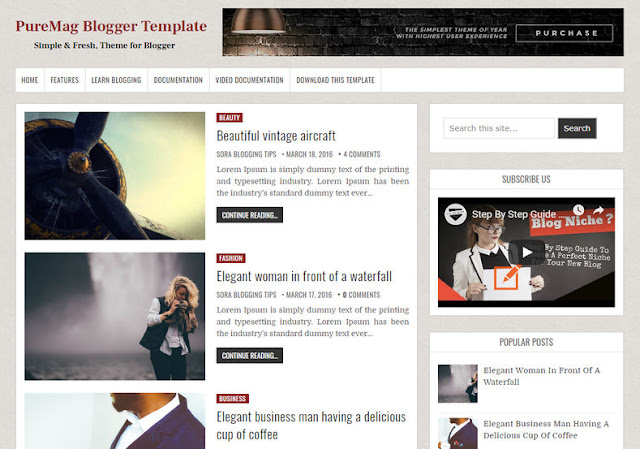
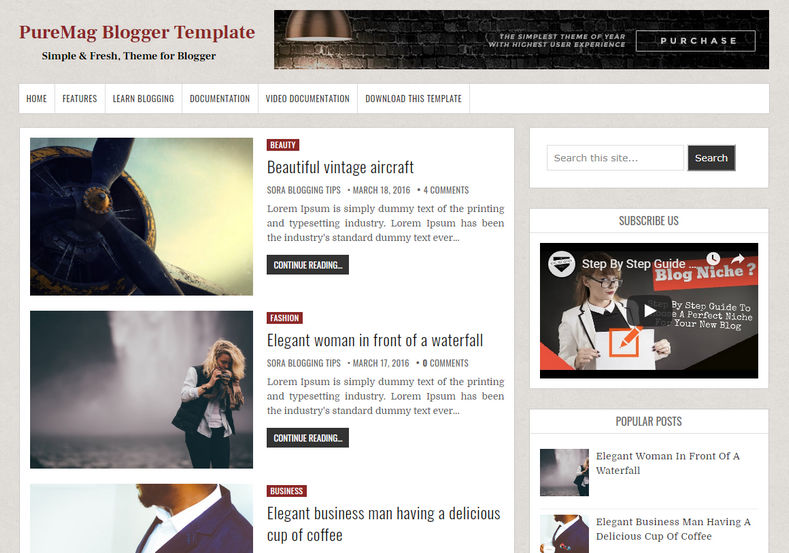
PureMag Blogger Template is a super simplified and clear blogging blogger theme, with minimal approach and fast loading design, it can be used to create any micro niche blog. PureMag Style polished & beautifully balanced pages make it an ideal template for almost all types of blog.
You have made a good decision by choosing our template. You can check the live demo or download the template through the button below and also Please Read this documentation carefully in order to set up your blog and please note that there’s no support for free users.

Basic Setup

  1. Template Installation
  2. Logo Setup
  3. Template Setting
  4. Shortcodes & Markups
  5. Create Sitemap

Video Documentation

You can check this below video to understand the setup process much more easily, just click the below image to watch the video directly on YouTube, or click this link - How To Setup PureMag Blogger Template - OmTemplates


Main Menu/Dropdown Menu/Multi Dropdown

On Blogger Dashbord Click Theme
Click Edit HTML
(Menu) Scroll down and Find this Code :
<ul> <li><a href='/'>Home</a></li> <li><a href='#'>Features <font size='1'/></a> <ul class='menus'> <li><a href='#'>Multi Dropdown <font size='1'/></a> <ul class='menus-2'> <li><a href='#'>Tab 1</a></li> <li><a href='#'>Tab 2</a></li> <li><a href='#'>Tab 3</a></li> </ul> </li> <li><a href='#'>Shortcodes</a></li> <li><a href='#'>Sitemap</a></li> <li><a href='#'>Error Page</a></li> </ul> </li> <li><a href='#'>Video Documentation</a></li> <li><a href='#'>Documentation</a></li> <li><a href='#'>Download This Template</a></li> </ul>
Change # with your desired url. 

Facebook Page Plugin:

<center><div class="fb-padding"><div id="fb-root"></div>
<script>(function(d, s, id) {
  var js, fjs = d.getElementsByTagName(s)[0];
  if (d.getElementById(id)) return;
  js = d.createElement(s); js.id = id;
  js.src = "//connect.facebook.net/pt_BR/sdk.js#xfbml=1&version=v2.3&appId=1395743857335531";
  fjs.parentNode.insertBefore(js, fjs);
}(document, 'script', 'facebook-jssdk'));</script>
<div class="fb-page" data-href="https://www.facebook.com/omtemplates" data-width="280" data-height="230" data-hide-cover="false" data-show-facepile="true" data-show-posts="false"><div class="fb-xfbml-parse-ignore"></div></div></div></center>
or you can follow this tutorial if above method won't work

Installation And Custom Services

We provide plenty of templates for free but if you want something unique for your blog then let us create a unique design for your blog, Just tell us your needs and we will convert your dream design into reality. We also Provide Blogger Template Installation Service. Our Installation service gives you a simple, quick and secure way of getting your template setup without hassle.
Sunday, February 24, 2019

Dyna Blogger Template
Dyna Blogger Template is a clean and elegant, easy to use, 100% responsive, 3 columns blogging theme for blogger. It has theme options to customize various aspects of the theme and has clean post summaries, full-width layout for posts/pages,menu and sidebars, header widget, left and right sidebars, 4 columns footer, social buttons and more.! Following are some of the key features of Dyna Blogger Template.
Dyna Blogger Template
  

Thursday, February 21, 2019

How To Setup Dyna Blogger Template [OmTemplates]

Dyna Blogger Template is a three column beautifully designed hand crafted blogger template, that has the amazing capability to establish an attractive and eye catching blog. being a three column design it provides you the freedom to add extra advertisement banners.
You have made a good decision by choosing our template. You can check the live demo or download the template through the button below and also Please Read this documentation carefully in order to set up your blog and please note that there’s no support for free users.

Basic Setup

  1. Template Installation
  2. Logo Setup
  3. Template Setting
  4. Shortcodes & Markups
  5. Create Sitemap

Video Documentation

You can check this below video to understand the setup process much more easily, just click the below image to watch the video directly on YouTube, or click this link - How To Setup Dyna Blogger Template - OmTemplates


Main Menu/Dropdown Menu/Multi Dropdown

On Blogger Dashbord Click Theme
Click Edit HTML
(Menu) Scroll down and Find this Code :
 <ul>    
<li><a href='/'>Home</a></li>          
<li><a href='#'>Features <font size='1'/></a>    
<ul class='menus'>    
<li><a href='#'>Multi Dropdown <font size='1'/></a>    
<ul class='menus-2'>    
 <li><a href='#'>Tab 1</a></li>    
 <li><a href='#'>Tab 2</a></li>    
 <li><a href='#'>Tab 3</a></li>    
</ul>    
</li>   
 <li><a href='https://danshin-omtemplates.blogspot.com/p/post-format-and-page-markup.html'>Shortcodes</a></li>    
 <li><a href='http://www.sorabloggingtips.com/2017/01/how-to-add-sitemap-widget-in-blogspot-blogs.html'>Sitemap</a></li>    
  <li><a href='/omtemplates'>Error Page</a></li>    
</ul>   
</li>    
<li><a href='#'>Video Documentation</a></li>    
    
<li><a href='#'>Documentation</a></li>
<li><a href='#'>Download This Template</a></li>    
       </ul>
Change # with your desired url.

Social Widget

On Blogger Dashbord Click Theme
Click Edit HTML
(Social Widget) Scroll down and Find this Code :
 <ul class='icon'>
<li><a class='twitter' expr:href=' &quot;http://twitter.com/pin/create/button/?url=&quot; + data:post.url + &quot;&amp;media=&quot; + data:post.firstImageUrl + &quot;&amp;description=&quot; + data:post.snippet' rel='nofollow' target='_blank' title='twitter'><i class='fa fa-twitter'/></a></li>

<li><a class='facebook' expr:href='&quot;http://www.facebook.com/sharer.php?u=&quot; + data:post.url + &quot;&amp;title=&quot;+ data:post.title' rel='nofollow' target='_blank' title='facebook'><i class='fa fa-facebook'/></a></li>

<li><a class='googleplus' expr:href='&quot;https://plus.google.com/share?url=&quot; + data:post.url + &quot;&amp;title=&quot; + data:post.title ' rel='nofollow' target='_blank' title='googleplus'><i class='fa fa-google-plus'/></a></li>

<li><a class='pinterest' expr:href='&quot;http://pinterest.com/share?url=&quot; + data:post.url + &quot;&amp;title=&quot; + data:post.title ' rel='nofollow' target='_blank' title='pinterest'><i class='fa fa-pinterest'/></a></li>

<li><a class='linkedin' expr:href='&quot;http://www.linkedin.com/shareArticle?url=&quot; + data:post.url + &quot;&amp;title=&quot;+ data:post.title' rel='nofollow' target='_blank' title='linkedin'><i class='fa fa-linkedin'/></a></li>

<li><a class='instagram' expr:href='&quot;http://www.instagram.com/shareArticle?url=&quot; + data:post.url + &quot;&amp;title=&quot;+ data:post.title' rel='nofollow' target='_blank' title='instagram'><i class='fa fa-instagram'/></a></li>

<li><a class='flickr' expr:href='&quot;http://www.flickr.com/shareArticle?url=&quot; + data:post.url + &quot;&amp;title=&quot;+ data:post.title' rel='nofollow' target='_blank' title='flickr'><i class='fa fa-linkedin'/></a></li>

<li><a class='youtube' expr:href='&quot;http://www.youtube.com/shareArticle?url=&quot; + data:post.url + &quot;&amp;title=&quot;+ data:post.title' rel='nofollow' target='_blank' title='youtube'><i class='fa fa-youtube'/></a></li>

<li><a class='vimeo' expr:href='&quot;http://www.vimeo.com/shareArticle?url=&quot; + data:post.url + &quot;&amp;title=&quot;+ data:post.title' rel='nofollow' target='_blank' title='vimeo'><i class='fa fa-vimeo'/></a></li>


</ul>
Change # with your desired url.

Facebook Page Plugin:

<center><div class="fb-padding"><div id="fb-root"></div>
<script>(function(d, s, id) {
  var js, fjs = d.getElementsByTagName(s)[0];
  if (d.getElementById(id)) return;
  js = d.createElement(s); js.id = id;
  js.src = "//connect.facebook.net/pt_BR/sdk.js#xfbml=1&version=v2.3&appId=1395743857335531";
  fjs.parentNode.insertBefore(js, fjs);
}(document, 'script', 'facebook-jssdk'));</script>
<div class="fb-page" data-href="https://www.facebook.com/omtemplates" data-width="280" data-height="230" data-hide-cover="false" data-show-facepile="true" data-show-posts="false"><div class="fb-xfbml-parse-ignore"></div></div></div></center>
or you can follow this tutorial if above method won't work

Installation And Custom Services

We provide plenty of templates for free but if you want something unique for your blog then let us create a unique design for your blog, Just tell us your needs and we will convert your dream design into reality. We also Provide Blogger Template Installation Service. Our Installation service gives you a simple, quick and secure way of getting your template setup without hassle.